 Ochrestack
Xsdtrail quick start
Installing Xsdtrail, your first Design tab, and the licence. Back to the Xsdtrail product page.
Install (IntelliJ IDEA 2025.1 or later, or another JetBrains IDE on the 2025.1 platform with XML support)
- In the IDE, open Settings > Plugins > Marketplace, search for Xsdtrail (once the listing is live; it has not been submitted yet), and click Install.
- Restart the IDE if asked.
Xsdtrail registers no file type and changes no file type association, so installing it does not change how your files open.
Open the Design tab
- Open any file whose root element is
xs:schemaorwsdl:definitions. The extension does not matter:.xsd,.XSD,.wsdland.xmlall work, because the tab is offered from the file's content. - Two tabs appear under the editor: Text and Design. Click Design.
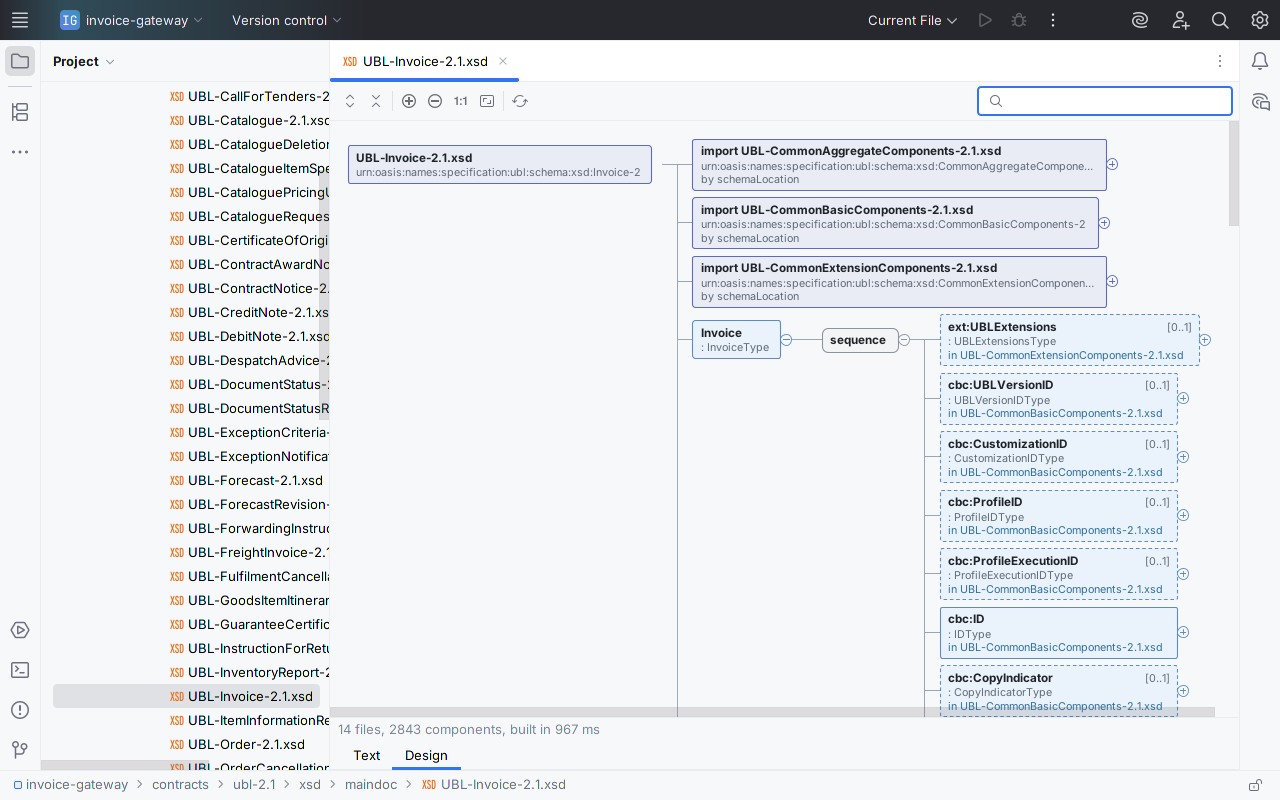
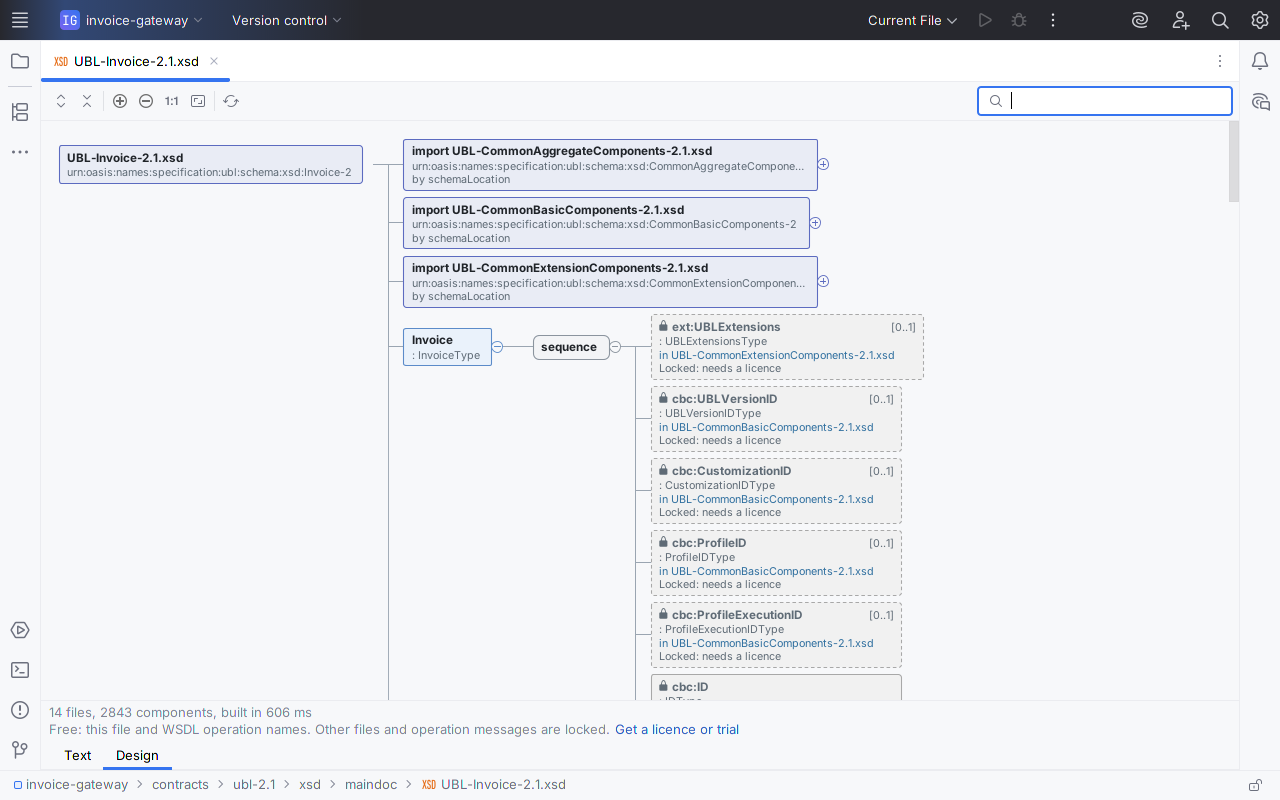
- The diagram opens at the first level: global elements and types, and the include, import and redefine lines of the file. It builds in the background, so the Text tab stays typeable. The status line under the diagram shows the number of files, the number of components and the build time.
Read the diagram
- Click the ⊕ at the right edge of a box, or select it and press Space or →, to unfold it.
- Elements show their name and type. Optional ones have a dashed border, repeating ones a stacked shadow, and the cardinality is in the box:
[0..1],[1..*]. sequence,choiceandallappear as their own boxes between a parent and its children. Attributes appear as@namewith required or optional, default and fixed values.extension of …andrestriction of …boxes unfold to the base type. Enumeration values appear as= value.- ↻ marks a type that already appears above it, instead of unfolding forever.
- A red box is something that cannot be resolved; it names the missing namespace, file or declaration. A long reason wraps over up to three lines, and the tooltip has all of it.
- Hover a box for its tooltip: the
xs:documentationtext and the details of the declaration.
Toolbar: Expand All (unfolds up to 4,000 boxes, counting those already shown; when the next unfold would pass that, it stops and says so), Collapse All, Zoom In, Zoom Out, Actual Size, Fit to Window, Rebuild Diagram. Ctrl+mouse wheel zooms around the pointer. The search box on the right finds a global element or type by name; when several match equally well, the status line says "Match 1 of 2" with the file name, and Enter steps to the next.
Navigate both ways
- Diagram to source: double-click a box, or select it and press Enter. The editor opens at the declaration's line, in whichever file declares it (another file needs the licence).
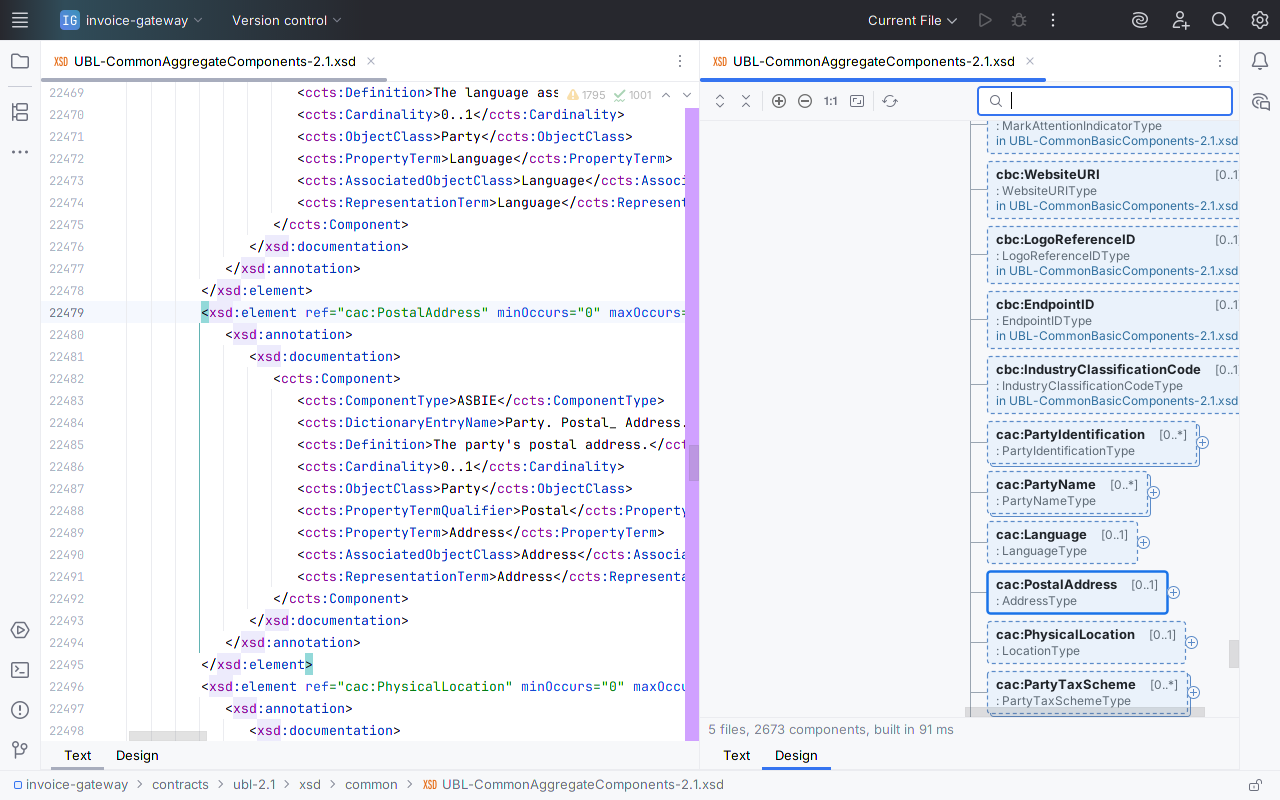
- Source to diagram: right-click in the editor and choose Show in Design. The Design tab opens with the box for the declaration under the caret selected.
- Follow the caret: use Window > Editor Tabs > Split Right and show Text on one side and Design on the other. Moving the caret in the source moves the selection in the diagram.
Multi-file schemas (licence)
xs:include, xs:import and xs:redefine are followed through relative schemaLocation values. An import with a namespace but no schemaLocation, or with one that does not resolve, is matched by targetNamespace:
- against schema files in the same folder (
.xsd,.wsdland.xml, any case); - then against
.xsdfiles elsewhere in the project; - then against
.xsdfiles in the project's libraries, for example a JAR of generated contracts.
Types and elements from other files appear in place, labelled with their file name. When a schema file is added, renamed or changed on disk, for example after a pull or a branch switch, the diagram rebuilds. While the IDE is still indexing, the project and library search waits: the import says so, and the diagram rebuilds when indexing ends. Nothing is ever downloaded: a schemaLocation that is a URL is reported as not downloaded.
WSDL operation view (operation names free, messages with a licence)
For a WSDL 1.1 file the Design tab has two sections. Types holds the schemas inline in wsdl:types. Services and operations lists each service, its ports with their addresses, each port's binding with SOAP 1.1 or 1.2 and the document or rpc style, and the operations; without a licence you see all of that for the open file, with each operation locked. With a licence an operation unfolds to its input, output and fault messages, their parts, and the XSD elements or types those parts reference. A missing message, part element or binding, and a binding that no port uses, appear as red boxes that say what is missing. An abstract WSDL, with operations in a wsdl:portType and no binding, lists those operations, each naming its portType.
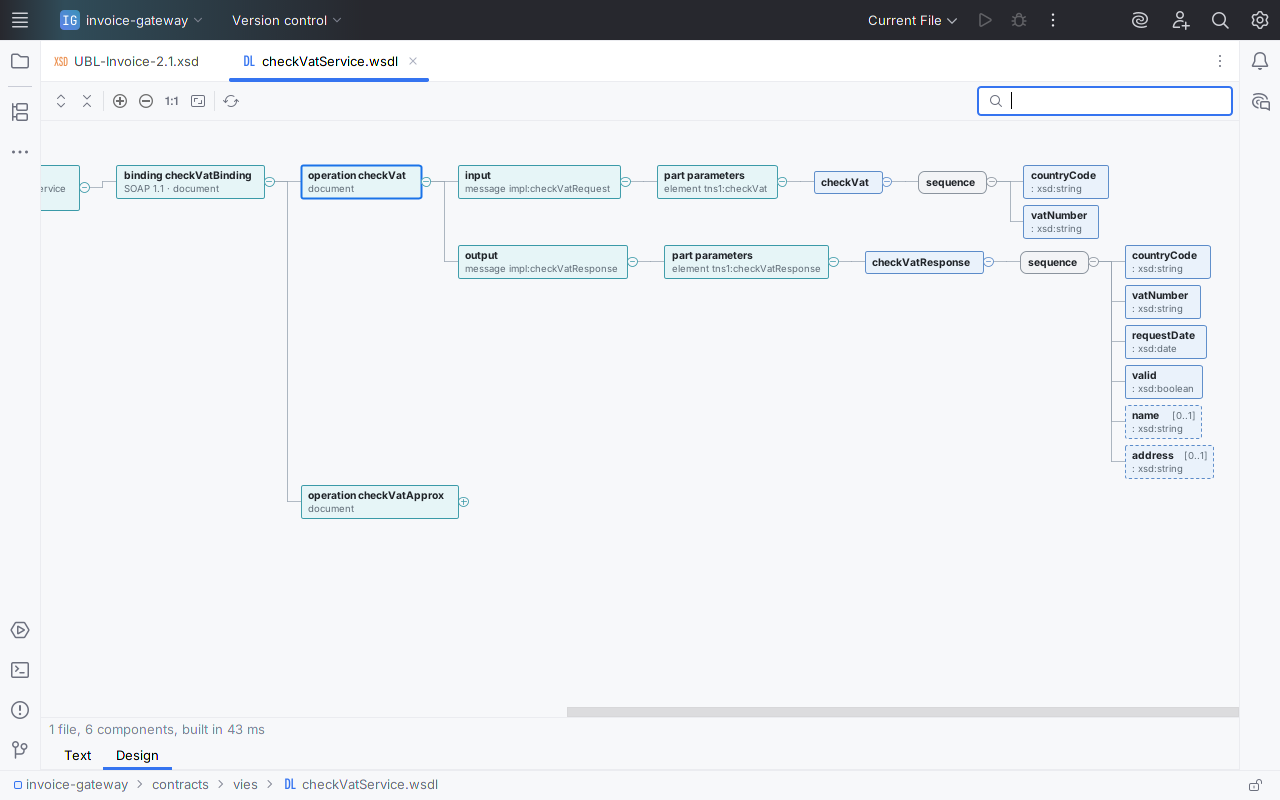
checkVatService.wsdl with a licence, unfolded from the binding to the fields of each message.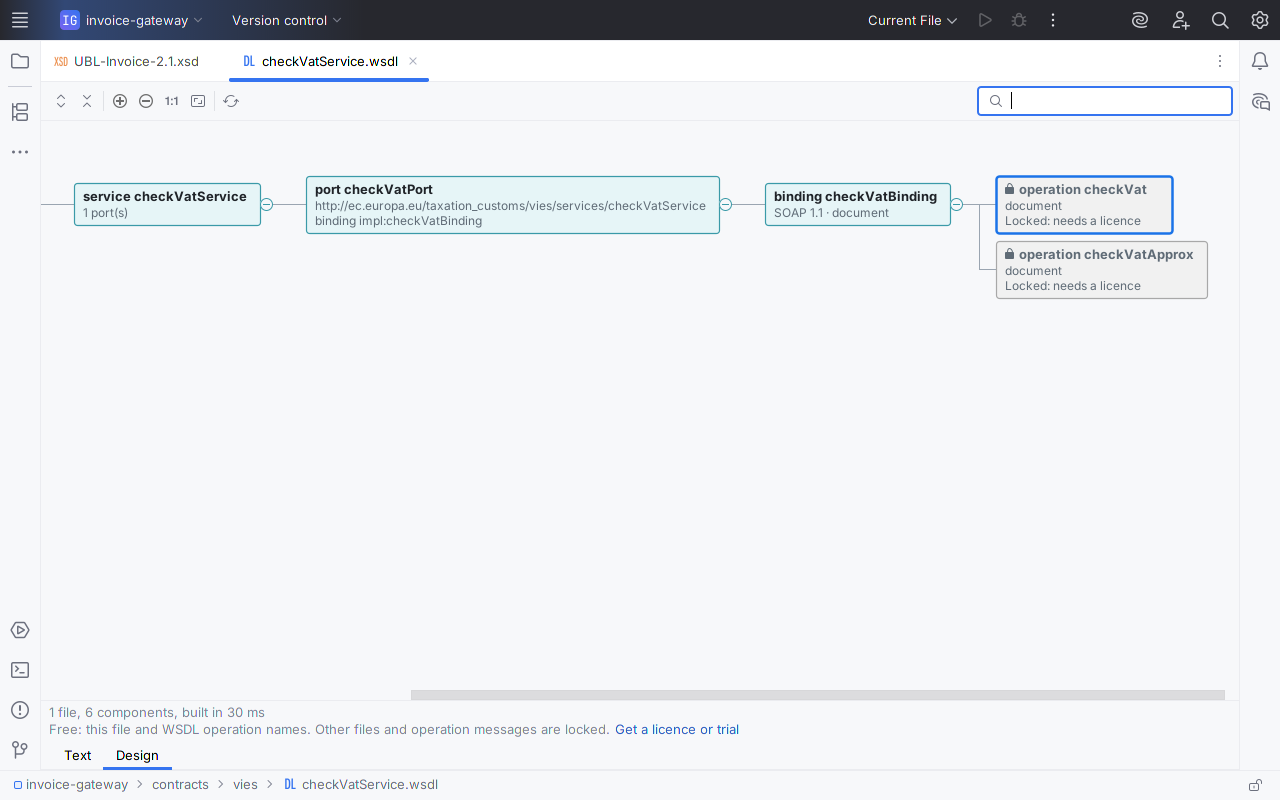
Licence and trial
Without a licence, every box from another file is shown with its name, its file label, a lock and "Locked: needs a licence". In a WSDL, each operation is shown by name and locked; double-clicking it says what the licence adds. Nothing pops up. Whenever something in the diagram is locked, a line under the status line reads "Free: this file and WSDL operation names. Other files and operation messages are locked." followed by Get a licence or trial, which opens the IDE's own licence dialog only when you click it. In IntelliJ IDEA Community the licence dialog is also under Help > Manage Licenses….
When the trial or licence becomes active, open Design tabs unlock by themselves; nothing needs reopening. The licence is a JetBrains Marketplace perpetual licence: $12 once, personal or commercial, every update included, nothing to renew. A 30-day trial unlocks everything, and the free features never lock.
Known limits
- Xsdtrail reads schemas. It does not edit a schema from the diagram, generate sample XML or SOAP envelopes, export images, SVG or JSON, download remote schemas or read OASIS XML catalogs.
- Not supported: WSDL 2.0, XSD 1.1 assertions and conditional types, DTD, RELAX NG, validation of XML instance documents. English only.
- The root element must start within the first 1 MB of the file.
- When one namespace matches several files that declare the same component, the diagram uses the first (folder before project, then by path) and the import box warns.
- Expand All unfolds up to 4,000 boxes, counting those already shown; a file whose first level alone has more than 4,000 declarations unfolds nothing. Unfold the rest one branch at a time.
- On files over the IDE's code-insight limit (2.5 MB by default), following the caret can take a tenth of a second per move.
Privacy
Xsdtrail makes no network calls and collects nothing: no telemetry, no analytics, no personal data. It reads only the files of the open project: the file you open, the files it includes or imports, and, to match imports by namespace, the start of schema files in the same folder and of the .xsd files in the project and its libraries. Licence status comes from your IDE's JetBrains Marketplace licensing. See also the privacy policy.
Support
Email [email protected] with the IDE version (Help > About) and, if you can, the schema or a reduced copy of it. Bug reports and feature requests are welcome at the same address.