 Ochrestack
Sortlatch for Confluence
When a new page is created, the alphabetical order is no longer respected. Sortlatch keeps a page's child pages A to Z, permanently: new, renamed and moved pages go to their place within minutes.
Free for up to 10 users, with every feature. From 11 users, $0.15 per user per month, and less per user above 100 users (all prices), billed by Atlassian.
Coming to the Atlassian Marketplace. Sortlatch has not been submitted yet, so it can't be installed today. When Atlassian lists it, this button will take you there. For a note on the day, email [email protected].
For Confluence Cloud (Atlassian Forge). Not for Confluence Data Center or Server. English only. Questions first? [email protected]. Documentation and install steps
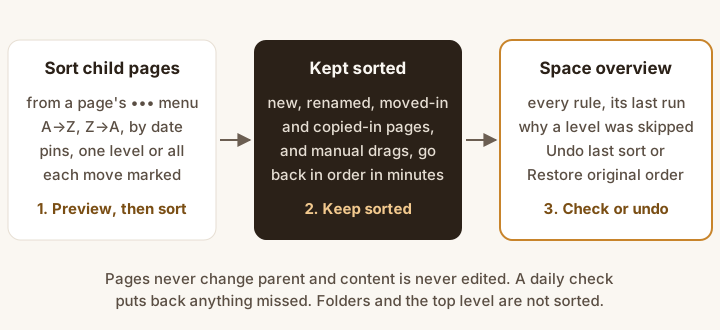
- Sort child pages from a page's ••• menu. The preview marks every page that will move.
- Keep sorted. New, renamed, moved-in and copied-in pages, and manual drags, go back in order within minutes.
- Check or undo from Space settings > Sortlatch: every rule, its last run, Undo last sort and Restore original order.
Good to know: Confluence already sorts a parent's children A to Z once, from Space settings > Manage content > Reorder. If a space gets new pages rarely, pressing that button now and then is enough.
Sortlatch is for page trees that keep changing: customers, products, glossary terms, procedures, release notes. It keeps the order without anyone pressing a button, and adds Z to A, newest or oldest first, pins, every level below a page, undo and a space overview. If Confluence ships permanent sorting, Sortlatch is worth only those extras, and this page will say so.
What it does
- Keeps the order. Choose Keep sorted once on a page. From then on, a child page that is created, renamed, moved in or copied in is sorted into its place within a few minutes, and when someone drags the child pages out of order, the order comes back. On our test site each change was in place 11 to 17 seconds later. A daily check puts back anything that was missed.
- Numbers in natural order. Title A→Z puts Release 2 before Release 10, ignores upper and lower case, and puts accented letters next to their base letter, so Émile Laurent Associés sits next to Emerald Freight. Title Z→A, Newest first and Oldest first (by creation date) are there too.
- Pins. Pages that always come first or last, such as an Overview at the top and an Archive at the bottom.
- One level or all levels below. Sort the child pages of one page, or every level of the page tree under it. Up to 1,000 child pages under one page, sorted in one run with progress on the space overview.
- See the new order first. It lists each level in its new order, marks every page that will move, and gives the count. Then Sort once, or Keep sorted to save the choice as a rule and sort now.
- Pages it cannot see. If page restrictions keep Sortlatch out of some child pages, the preview says how many, and the rest are sorted around them only after you confirm. Pages you are not allowed to view are counted, never listed.
- Undo. Undo last sort puts back what the latest run moved. Restore original order puts back the order from before the rule first sorted, then removes the rule. Pausing or removing a rule never moves a page.
- A space overview. Space settings > Sortlatch lists every rule in the space with its order, depth, pins, status, last run and pages moved, and why a level was skipped. Sort now, Pause, Resume, Undo, Restore and Remove are on each row. Confluence admins also get one list of every rule on the site.
- Only the position changes. Moves create no new page version, page content is never edited, and pages never change parent.
- Only people who can edit a page can sort it. Everyone else is told why.
What the test runs showed
Sortlatch is tested on a real Confluence Cloud site, through the app's own backend, with every resulting order read back from Confluence. From the runs on 6 November 2026:
| Change under a page with a rule | In its place after |
|---|---|
| A page created ("Brightwater Ltd") | 11 s |
| A page renamed ("Initech" to "Wayne Enterprises") | 11 s |
| A page moved in from elsewhere in the space | 11–12 s |
| A copy of a page | 11 s |
| Two child pages dragged out of order | 11–17 s |
| A page created between two pinned pages | 11 s |
The orders that came back from Confluence after each sort:
Title A→Z: Release 1, Release 2, Release 3, Release 10, Release 11, Release 12
Title Z→A: Release 12, Release 11, Release 10, Release 3, Release 2, Release 1
Pins at both ends: Overview, Atlas CRM, Beacon Analytics, Ledger Pro, Zephyr Mobile, Archive (discontinued)
A page created later, Aurora Payments, sorted in between the pins: Overview, Atlas CRM, Aurora Payments, Beacon Analytics, Ledger Pro, Zephyr Mobile, Archive (discontinued)
And the reason Sortlatch gave for a page whose child pages include a folder, word for word:
Not sorted: this level has a folder among its child pages ("Onboarding"). Sortlatch moves pages only: Confluence's move for pages cannot move folders, whiteboards, databases or smart links, so sorting around them would leave the level half sorted. Move them to another page, or order this level by hand.
These lines come from the test log, laid out here by us; they are not screenshots of Confluence.
Price
Free for a site with up to 10 users, with every feature. A site with 11 or more users pays each month for every user, at the rate of the band the user falls in, the way Atlassian prices tiered apps (like tax brackets):
| Users | Per user per month |
|---|---|
| 1st to 100th | $0.15 |
| 101st to 250th | $0.12 |
| 251st to 1,000th | $0.06 |
| 1,001st to 2,500th | $0.04 |
| 2,501st to 5,000th | $0.03 |
| Beyond 5,000 | $0.02 |
| Your site | Per month | Per year |
|---|---|---|
| 8 users | $0 | $0 |
| 45 users | 45 × $0.15 = $6.75 | $67.50 |
| 300 users | 100 × $0.15 + 150 × $0.12 + 50 × $0.06 = $36 | $360 |
| 1,000 users | $15 + $18 + 750 × $0.06 = $78 | $780 |
These are the prices the Marketplace listing will carry.
One edition: every feature is in every tier, with nothing held back for a higher plan. Atlassian bills the subscription, monthly or annually (annual is 10 times the monthly price), and offers its standard free trial. Atlassian bills the renewal and sends the renewal notice; we add no upsell, no feature lock and no price change at renewal.
Who can use it
| Who | Can |
|---|---|
| Anyone who can edit a page | Sort its child pages, save a rule on it, and undo, pause, resume, restore or remove that rule |
| Space admins | Open Space settings > Sortlatch to see the space's rules. Each action there still needs edit permission on the rule's page. |
| Confluence admins | See every rule on the site under Confluence admin settings > Sortlatch |
| Everyone else | Opening Sort child pages tells them why they can't sort |
Permissions are checked on the server on every request: Confluence is asked whether the person may edit the page. The moves themselves are made by the app.
Documentation
The step-by-step guide is the Sortlatch quick start.
Install
- In Confluence Cloud, open Apps > Explore more apps, search for Sortlatch for Confluence (once the listing is live) and choose Get app. A Confluence admin installs it for the whole site and approves the permissions below.
- There are no settings. Sortlatch appears in every page's ••• menu as Sort child pages, in Space settings as a Sortlatch tab, and in Confluence admin settings as Sortlatch.
- The first time each person opens Sort child pages or the Sortlatch tab, Confluence asks them to allow Sortlatch access. Sortlatch uses that access only to check that the person may edit the page, and to count the child pages the person can see.
| Permission (scope) | Used for |
|---|---|
read:hierarchical-content:confluence | Reading a page's child pages in their order, and the levels below it |
read:page:confluence | A page's title, parent and creation date (for Newest and Oldest first) |
write:page:confluence | Moving a page before or after one of its siblings. Nothing else is written. |
read:content.permission:confluence | Checking that the person sorting may edit the page |
read:confluence-content.summary | Being told when a page is created, renamed, moved, copied, restored or reordered |
read:confluence-user | Checking that the site-wide list is opened by a Confluence admin |
storage:app | Rules, the orders kept for undo and restore, and runs, in app storage inside Atlassian |
Questions
How fast does a new page move?
Within a few minutes. Confluence tells apps about page changes up to 3 minutes after they happen. On our test site it took 11 to 17 seconds (median 11). A daily check puts back anything that was missed.
Does it sort folders?
No. Folders, whiteboards, databases and smart links are not sorted, and neither are pages directly inside folders. If any of them is among a page's child pages, that level is skipped, and the preview and the space overview say why.
What to do instead: keep the pages under a page rather than directly in a folder. That page can itself sit inside a folder: put the rule on it, and its child pages are sorted and kept sorted. For example, a folder Engineering holding a page Release notes, with the releases under that page.
Does it sort the top level of a space?
No. For the pages directly under the space's home page, use Space settings > Manage content > Reorder. A rule with "All levels below" on the home page still sorts every level beneath the top level.
How many pages can it handle?
Up to 1,000 child pages under one page, sorted in one run with progress on the space overview. On our test site, 1,000 shuffled glossary terms took 936 to 938 moves and between 448 and 466 seconds, over five runs. A rule with "All levels below" covers up to 5,000 pages in total. A page with more than 1,000 child pages is skipped, with the reason.
Does sorting create page versions or change content?
No. Only the position among siblings changes. On our test site a moved page stayed at version 1, page content is never edited, and pages never change parent.
What about pages I'm not allowed to see, or that Sortlatch can't see?
The preview never lists pages you can't view; it only counts them. If page restrictions keep Sortlatch out of some child pages, the preview says how many, and the pages it can see are sorted among themselves only after you confirm. The hidden pages stay where they are. When you open the space overview, it counts them directly under each rule's page. Background sorting can't see them, so a page restricted after a rule was saved shows up only when someone opens the overview or the dialog.
Can I undo?
Yes. Undo last sort puts back what the latest run moved and pauses the rule; choose Resume to keep sorting. Restore original order puts back the order from before the rule first sorted, then removes the rule; pages added since stay next to the page they follow now.
What happens when two rules overlap?
One rule per level. A page with its own rule keeps it, and an "All levels below" rule higher up leaves that page's child pages to it.
What happens to a page restored from the trash?
Confluence decides where a restored page goes. On our test site, a page restored through Confluence's REST API came back at the top level of the space, which Sortlatch does not sort. Once a restored page is under a page with a rule, Sortlatch sorts it in.
How are numbers with decimals sorted?
Like version numbers: "Fee 1.5" comes before "Fee 1.25", as v1.5 comes before v1.25, and Release 2.9.1 comes before Release 2.10.0. Digits typed in full-width form are not read as numbers.
How are punctuation and words like "The" sorted?
Punctuation counts, by its character: a hyphen sorts before letters and an en dash after them, so "Acme Corp - EMEA" comes before "ACME Corp – APAC". Confluence's editor sometimes turns a typed hyphen into a dash, so check titles that differ only there. A leading "The" counts like any other word: "The Grand Hotel" sorts under T. A version with a suffix comes after the bare version: "3.0.0" before "3.0.0-beta.2".
What if Atlassian ships permanent sorting?
Then Confluence does the main job itself, and Sortlatch is worth only its extras: Z to A, dates, pins, every level below, undo and the overview. This page will say so on the day.
Known limits
- A few minutes, not instantly. Confluence delivers page events to apps up to 3 minutes after a change.
- Folders, whiteboards, databases and smart links are not sorted, and a level that has one among its child pages is skipped, with the reason. Pages directly inside folders are not sorted; keep them under a page instead (see Questions).
- The top level of a space is not sorted.
- Up to 1,000 child pages under one page, and up to 5,000 pages in one "All levels below" rule.
- Pages Sortlatch cannot see stay where they are. A page restricted after a rule was saved is reported only when someone opens the overview or the dialog.
- Telling Sortlatch's moves from people's. Sortlatch ignores only changes made by its own account, so a person's drag is always put right. If Confluence ever sends a change without an account, a drag within about 10 seconds of Sortlatch moving that same page can wait for the daily check.
- Pins are picked from the first level, up to 50.
- Pages only: blog posts are not sorted. Confluence Cloud only; no Data Center or Server. English only.
How we tested
One test suite installs Sortlatch on a real Confluence Cloud site, creates a space with realistic page trees through Confluence's API, and drives the app through its own backend. Its last runs, on 6 November 2026, passed:
- Customers, 40 company pages in random order plus one page restricted from the app: the preview counted the hidden page and refused to keep sorting until confirmed; the run moved exactly the pages the preview marked, with no failures; Confluence then listed the 40 pages in natural A to Z order, and the restricted page had not moved.
- A new page landed at position 41 of 41 before Sortlatch acted, and was in its place 11 seconds later. Renamed, moved-in and copied-in pages, a hand reorder and a page between pins followed (see the table above).
- Undo last sort put back the 2 pages of the latest run and paused the rule. Restore original order put the 40 pages back in their order from before the first sort and removed the rule.
- Title Z→A, Newest first, Oldest first, pins at both ends, and All levels below over 4 levels, each read back from Confluence.
- Glossary, 1,000 shuffled terms: Term 1 to Term 1000 in order after one run, with no failures and progress on the space overview throughout. Sortlatch's own moves set off no further sorting.
- The folder parent was skipped with its reason, the space home page was treated as the top level, and the site-wide list was shown to a Confluence admin and refused to anyone else.
An automated suite of 112 tests covers the ordering, the preview, keeping sorted for each kind of change, undo and restore, the stated limits, Confluence's documented reasons for refusing a move, and the three screens rendered through Atlassian's own UI Kit code.
Not yet covered:
- Opening the screens in a browser. Everything behind the dialog and the overview has run on a real site, but the screens have not yet been opened by a person in Confluence, including the first-use "allow access" prompt. They will be before the listing goes to Atlassian.
- A move Confluence refuses. No move has failed on the real site, so the plain-words reasons have been checked only against Confluence's documented error answers.
- A restore from Confluence's own trash screen (see Questions).
- A rule on a page that sits inside a folder (the workaround under "Does it sort folders?"): covered by the automated tests, not yet run on the real site.
- Which Confluence Cloud plans it has been tried on: only our test site's.
Privacy
Nothing leaves Atlassian. Sortlatch runs on Atlassian Forge, calls only your own site's Confluence API, and has no permission to reach any other server. No analytics, no tracking. Its app storage holds page IDs, page titles, positions (the order before a sort, for undo and restore) and the rules you save. It reads no page content and stores none. Uninstalling the app removes its storage. See also the privacy policy.
Support
Email [email protected] with your site URL, the page with the rule, and what the space overview says about it. We answer every message. Bug reports and feature requests are welcome at the same address.