 Ochrestack
Linkrounds quick start
Installing Linkrounds, your first scan and your first fix, then Linkrounds Pro. Back to the Linkrounds product page.
Install (WordPress 6.5 or newer, PHP 7.4 or newer)
- Download
linkrounds-1.1.0.zip. Do not unzip it. - In WordPress, open Plugins > Add New Plugin, click Upload Plugin, choose the zip, then Install Now and Activate.
- Open Tools > Linkrounds.
There is nothing to sign up for: no account, no key and no link limit. Once Linkrounds is listed on WordPress.org you will also be able to search for "Linkrounds" under Plugins > Add New Plugin.
First scan
- Click Scan now. Linkrounds reads your published posts, pages, public custom post types, synced patterns, the custom links in classic menus, and block-theme Navigation menus, and checks every link and image in them.
- The count climbs as links are checked ("16 of 63 links checked"). Pause and Resume are next to it. You can leave the page; the scan carries on in the background.

wp-cron.php.
The four answers
- Broken: not found (404), gone (410), or the domain does not exist, and the same thing happened again on a second check at least an hour later.
- Redirected: the address forwards to one that works. The final address is shown.
- Inconclusive: the other site blocked the check (403, 999), wanted a login (401), asked us to slow down (429), had a server error or did not answer in time. The reason is given. A link that failed once and is waiting for its second check is here too, with the time of that check. Inconclusive is never counted as broken.
- OK: the link works.
So after your first scan, dead links show as Inconclusive with "checked again after …". Linkrounds checks them again by itself once that time has passed; only then do they move to Broken. The wait is 1 hour by default; you can choose 6 or 24 hours under Settings.
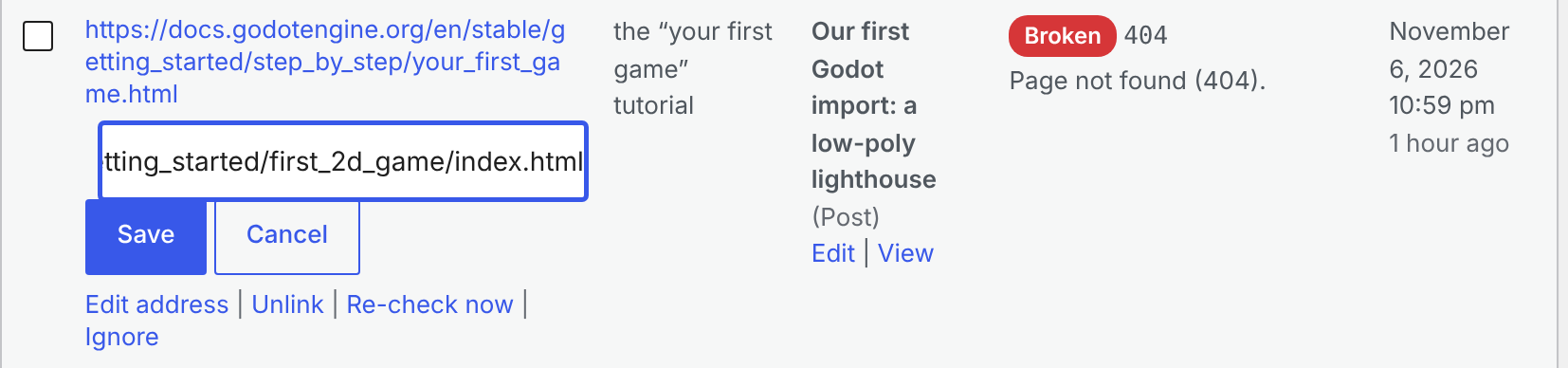
Each row shows the page the link is on (with Edit and View), the full address, the link text, the status code, the reason and when it was last checked. Filter by answer or post type, search by address, and use Re-check now on any row.
Fix a link, and undo it
- Hover a row. Choose Edit address, type the new address and click Save; or choose Unlink to remove the link and keep its words.
- The message says what changed. Only that link in that post changes, and an edited address is checked straight away.
- To undo, open the post, then Revisions, and restore the version before the change.

To fix several links at once, tick their rows, pick Unlink or Edit address under Bulk actions and click Apply. Only the rows you ticked change. Menu items have no revisions in WordPress; the message after a menu fix says so, and you undo it under Appearance > Menus.
Exclusions and re-checks
- Settings > Excluded addresses: one per line.
example.comalso covers its subdomains;*is a wildcard, as in*.example.comorexample.com/members/*. - Untick post types, synced patterns or menu links you do not want scanned.
- Ignore on a row hides that one link; the Ignored filter lists it and undoes it.
- Broken and Inconclusive links are re-checked every day, and saving a post re-checks its links, so a link you fix in the editor leaves the list without a new scan.
Linkrounds Pro
- Install and activate the free plugin first.
- Install
linkrounds-pro.zipthe same way: Plugins > Add New Plugin > Upload Plugin, Install Now, Activate. WordPress will not activate Pro without the free plugin. - Open Tools > Linkrounds > Schedule & email. Choose daily, weekly or monthly and the hour (in the time zone set under Settings > General), add the addresses that should get the report, one per line, and save.
- On the Results tab, Export CSV of these results downloads the rows of the current filter, all pages.
The email report is sent after each scheduled scan, once the links that failed have had their second check, through your site's own mail setup. Make sure your site can send email (many hosts need an SMTP plugin for that).
Limits
- Not checked in version 1: custom fields, page-builder data stored outside the post content, widgets, comments, theme options, excerpts, templates and template parts edited in the Site Editor,
srcsetimage sets, and video or embed addresses. - A site that serves 404 to anything but a browser ends up Broken although readers see the page. Open the link; if it works, Ignore it.
- A missing file in your uploads folder is checked on disk, so a redirect for an old upload address is not seen. Point the links at the new file with Edit address, or Ignore them.
- No network-wide view on multisite; it works per site.
Privacy
To check a link, your server sends a HEAD request (and a GET when HEAD does not succeed) to the linked address. Nothing else is sent: nothing about your site, your users or your content goes to Ochrestack or to any other service. No account, no telemetry, no licence or update check. Pro's email goes only to the addresses you set.
Support
Email [email protected] with your WordPress and PHP versions, the Linkrounds version, and the address and reason shown on the row that puzzles you.