 Ochrestack
Attachkeep for Confluence
Old attachments nobody uses are eating your Confluence storage. Find the files no page, blog post, comment or diagram on your site refers to, including uploads from people who have left, and clear them out safely.
Free for up to 10 users, with every feature. From 11 users, $0.25 per user per month, less above 100 users (every tier), billed by Atlassian.
Get it on the Atlassian Marketplace
Coming to the Atlassian Marketplace: not on the Marketplace yet, so it can't be installed today. This button will link to the listing once Atlassian has approved it. For a note when it is live, email [email protected].
For Confluence Cloud (Atlassian Forge). Not for Confluence Data Center or Server. English only. Questions first? [email protected]. Documentation and install steps
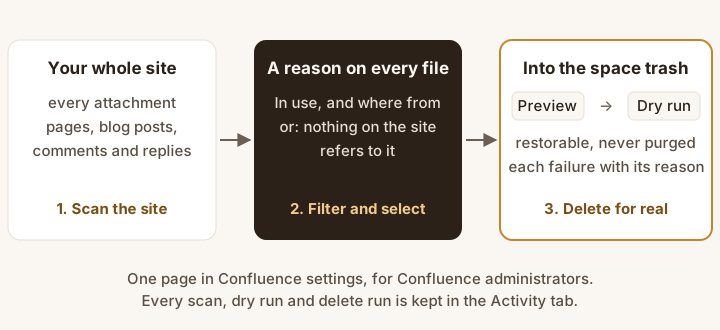
- Scan the site. Every attachment, checked against every page, blog post, comment and reply. The scan changes nothing.
- Filter and select. Each file says whether it is in use and where from, or that nothing on the site refers to it.
- Preview, dry run, then delete for real. Files go to the space trash, where they can be restored. Nothing is purged.
What it does
- Every attachment on the site in one list. Each row shows the file, its page, space, type, size, upload date, uploader, and whether the uploader's account is active, deactivated or closed. Total storage and storage per space, largest files first.
- "Unused" means unused across the whole site. A file counts as used when any page, blog post, footer comment, inline comment or reply links to it or shows it, from its own page or any other; pastes its download, image or preview link; or names it in a macro parameter, which is how draw.io and Gliffy diagrams keep theirs. A file on a page with an Attachments or Gallery macro, or named by a content property of its page (such as a cover picture), is used too.
- A reason on every row, such as referenced from a comment on "Design review", shown by the Attachments macro on its own page, named by a macro on "System overview" or no page, blog post or comment on the site references this file. Files on archived pages are listed apart, as On an archived page.
- Uploads from people who have left. Filter to uploader no longer active, and combine it with space, file type, minimum size, uploaded before a date, and unused only.
- Preview, dry run, then the space trash. The preview shows the count, megabytes and list. The dry run checks every file again (it still exists, it is on the same page, it is still unused, it isn't protected) and changes nothing. The real run moves each file to its space trash in the background, up to 1,000 files a run. One failure never stops the others, and the summary gives Confluence's reason for each.
- Your rules win. Files with your protected label (
keepby default) and every file in a space on your exclusion list can't be selected, previewed for deletion or deleted, even by a direct request to the app. - On the record. The Activity tab lists every scan, dry run and delete run: who ran it, when, the filters, the file count, megabytes and failures. Each delete run lists the files it moved, with links to their pages. Download CSV gives you the filtered file list, or every file of a dry run or delete run with its result and reason, to attach to a change ticket or keep for your records.
- Confluence administrators only, checked on the server against Confluence on every request. Everyone else, space administrators included, sees an explanation.
What a run tells you
A dry run and a delete run on a real Confluence Cloud site ended with these lines, word for word:
Dry run: 4 files (0.3 MB) would be moved to the space trash. Nothing was changed.
4 files (0.3 MB) moved to the space trash. A space administrator can restore any of them from the space trash.
Only the four files nothing used had moved; the twenty files that something on the site used, or that carried the protected label, were all still in place.
What the file list said on that site
Rows from the same test run (6 November 2026), with the status and reason the app gave each file, word for word. The site was a test space, so the names are plain; the layout below is ours, not a screenshot of Confluence.
| File | Page | Status | Why |
|---|---|---|---|
| a-big-unused.bin | Release notes | Unused | no page, blog post or comment on the site references this file |
| a-comment.txt | Release notes | In use | referenced from a comment on "Design review" |
| a-reply.txt | Release notes | In use | referenced from a comment on "Design review" (a reply) |
| budget-2026.txt | Release notes | In use | referenced from the page "Quarterly review" (a pasted download link) |
| contract-acme.txt | Contracts | In use | shown by the Attachments macro on its own page |
| team-photo.txt | Photo store | In use | shown by the Gallery macro on "Team page" |
| System context.png | Diagram source | In use | named by a macro on "System overview" (a draw.io diagram shown from another page) |
| a-keep.txt | Release notes | Unused | no page, blog post or comment on the site references this file. Can't be selected: protected by the label "keep" |
Page titles are shortened: each one also carried the run's number. Words in brackets say how the file was linked; they are not part of the app's text.
The delete run's CSV, first row, as the app wrote it (the account id, space key and page address are left out here):
Delete run,2026-11-06 22:47 UTC,<account id>,a-big-unused.bin,Release notes,…,250000,0.25,Moved to the space trash,,https://…/wiki/spaces/…/pages/…
What Confluence already does, and what you pay for
Confluence already lets a person with delete permission remove a file from a page's attachments, one at a time, and deleted files go to the space trash. Bulk delete of attachments is still an open suggestion (CLOUD-12500). What Attachkeep adds: the site-wide list, the check that nothing on the site uses a file, the filter for uploads from people who have left, the dry run, batch deletes that report each failure, and the activity log.
No drafts, no links from outside Confluence, and the trash only: Attachkeep can't see unpublished drafts or links to a file from outside Confluence (email, other websites), and it moves files to the space trash, never purging them. Drafts stay private to their author in Confluence, and an app can't act for someone whose account is deactivated, so drafts are left alone.
Finding the files nothing uses is a long-standing request: CONFCLOUD-16577 has been open since 2009.
Price
| Users on your Confluence site | Price |
|---|---|
| 1 to 10 | Free, every feature |
| 11 to 100 | $0.25 per user per month |
| 101 to 250 | $0.22 per user per month |
| 251 to 1,000 | $0.18 per user per month |
| 1,001 to 2,500 | $0.15 per user per month |
| 2,501 to 5,000 | $0.12 per user per month |
Above 10 users, every user on the site is billed at the rate of the site's tier: 50 users cost $12.50 a month, 400 users $72 a month. Annual is 10 × monthly.
Every feature is in every tier; nothing is held back for a paid add-on. Atlassian bills the subscription, gives the standard 30-day free trial, handles renewal and cancellation, and refunds under its own 30-day policy. Ochrestack adds nothing on top.
Documentation
The step-by-step guide is the Attachkeep quick start.
Install
- In Confluence Cloud, open Apps > Explore more apps and search for Attachkeep (once the listing is live).
- Choose Get app. A site administrator approves the permissions below.
- Open Confluence settings (the gear) > Attachment cleanup, in the Apps section of the sidebar, and choose Scan the site.
| Permission (scope) | Used for |
|---|---|
read:attachment:confluence | Listing attachments, and reading a file and its labels just before it is deleted |
delete:attachment:confluence | Moving the files you choose to the space trash |
read:page:confluence | Reading pages and blog posts, and their content properties, to see which files they use |
read:comment:confluence | Reading footer and inline comments to see which files they use |
read:label:confluence | Finding the protected label |
read:user:confluence | The uploader's name and account status |
read:confluence-user | Checking that you are a Confluence administrator |
storage:app | Settings, scan results and the activity log, kept in Forge storage inside Atlassian |
Questions
Does scanning change anything?
No. The scan only reads. Nothing moves until you confirm a delete run, and you can run a dry run first.
Can I undo a delete?
Yes. Files go to their space trash, and a space administrator can restore them there (Space settings > Trash). Attachkeep never purges. The Activity tab lists every moved file with a link to its page. On our test site, a file Attachkeep had moved to the trash was restored through Confluence's API and was current again.
What about draw.io and Gliffy diagrams?
These macros keep the diagram as an attachment and name it in a parameter. Any macro parameter on the site that equals a file's name, with or without its extension, keeps every file of that name. This errs toward keeping files: a panel titled "Roadmap" also keeps "Roadmap.png".
What about restricted pages?
Pages whose restrictions exclude the app aren't read. Their own files are listed as "Not checked" and never called unused. A link from such a page to a file on another page can't be seen.
How large a site does it handle?
Up to 1,000 files per delete run. On a real Confluence Cloud site, with a 20,000-file list stored in the app, each request on the Attachments tab took between 2.1 and 2.8 seconds inside the app over five runs; Forge allows 25. Larger lists, and scan times on very large sites, have not been measured yet. The progress bar shows how far a scan has got.
Are old versions of a file deleted or counted?
No. Size and upload date are those of the current version, and old versions are not touched.
Known limits
- Drafts are not cleaned up, and links from outside Confluence (email, Jira issues, other websites, bookmarks) can't be seen: such a file looks unused. That is why deletes only go to the trash.
- Whiteboards, databases and custom content are not scanned, and their attachments are not listed.
- No purge, no deleting old versions, no moving or downloading files, no scheduled clean-ups.
- A file moved to another page after the scan is skipped by the dry run and the delete run, with "run the scan again".
- Spaces are shown by their key, not their name.
- If your browser won't save a download from inside Confluence, the CSV opens in a text box for you to copy instead.
How we tested
One test suite installs Attachkeep on a real Confluence Cloud site, builds a space through Confluence's API, and runs scans, dry runs and a delete run through the app itself. On 6 November 2026 all 78 of its checks passed.
- Files referenced from another page, a blog post, a footer comment, an inline comment or a comment reply were all "In use" with the expected reason. So were files shown by the Attachments and Gallery macros, draw.io and Gliffy macros (including diagrams shown from another page), and pasted download, image and preview links.
- Only the files nothing used moved. They were in their page's trash afterwards, and the dry run had predicted the delete run exactly.
- A moved file restored from the trash came back as current.
- A link added in a comment after the scan stopped its file from moving, and the reason named the page the comment is on.
- The delete run's CSV listed the four moved files, each with a link to its page.
An automated suite of 94 tests covers the same rules, the permission checks, the activity log and the CSV files.
Not yet covered on a real site:
- Opening the page in a browser. The automated suite renders the page and clicks through it.
- Restoring through the trash screen. The test restored the file through Confluence's API.
- An uploader whose account has really been deactivated. The filter reads Confluence's own account status, and the tests cover deactivated and closed accounts.
- Diagrams drawn by the draw.io and Gliffy apps themselves. The test writes their macros the way those apps store them.
Privacy
Your data stays in Atlassian. Attachkeep runs on Atlassian Forge, calls only your site's Confluence API, and has no permission to reach any other server. No analytics, no telemetry. A CSV download is built from the app's own data and saved to your computer; nothing is sent anywhere else. Forge storage holds only the activity log and settings (the protected label and excluded spaces). A run's record includes what that run needs: for the latest scan, the list of files it found, replaced by the next scan. See also the privacy policy.
Support
Email [email protected] with your site's approximate number of attachments, what you did, and the text Attachkeep showed. We answer every message, usually within one business day. Bug reports and feature requests are welcome at the same address.