 Ochrestack
Actionyard quick start
Installing Actionyard and your first clean-up. The full manual, README.md, is inside the download. Back to the Actionyard product page.
Install (Blender 4.4 or newer; tested on 4.4, 4.5 LTS and 5.2 LTS)
- Download
actionyard-1.1.0.zip. Install the zip itself; do not unzip it first. (To read the manual, open the zip; it isREADME.mdinside.) - In Blender, open Edit > Preferences > Get Extensions.
- Blender may first ask about internet access, with Continue Offline and Allow Online Access. Actionyard needs no internet, so Continue Offline is fine.
- Open the drop-down menu (⌄) at the top right, choose Install from Disk... and pick the zip. Actionyard is enabled straight away.
- Open an NLA editor or a Dope Sheet, press N for the sidebar and click the Actionyard tab. The sidebar starts narrow: drag its left edge to widen it, so the Uses column and long names show.
Upgrading: install the new zip the same way; it replaces the old version. If Blender shows an error, remove Actionyard in Preferences > Get Extensions, restart Blender, then install the new zip.
A first clean-up
- Set the list to Stashed to see which actions live in stashes. The line above the list counts the actions in the file, the stashed ones and the ones with no users.
- Click an action to see its Used by places: is it still the active action somewhere, on an NLA track, or in an Action constraint? Each row names the object, its role and the slot. Click a row to select that object and make it active.
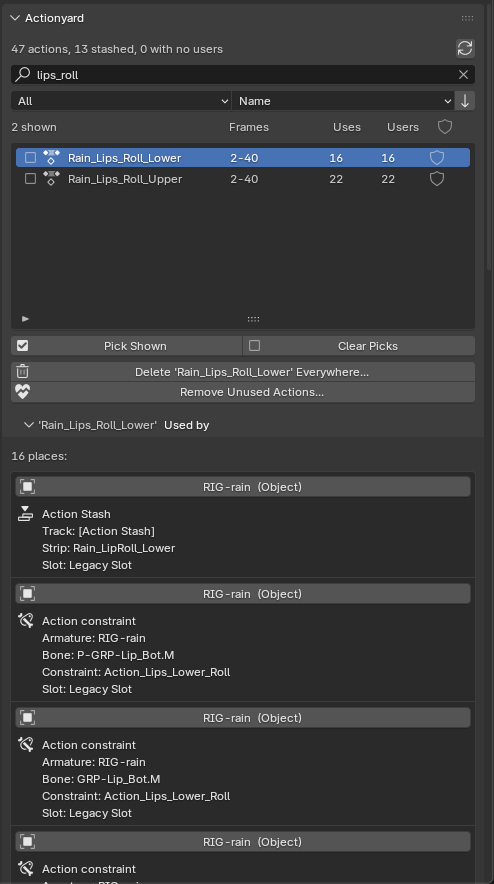
Used by on one of Rain's face actions: one Action Stash and 15 Action constraints (Blender 4.5, real size). - In Action Stashes, choose Active Object or Whole File and click Clear Stashes... Nothing changes until you confirm. The preview shows:
- how many stash tracks go, and from how many objects or other data-blocks;
- each action on them. An action that something else still uses says so and is left alone. Every other action has a tick: keep it in the file with Fake User (ticked by default), or untick it to let it go;
- each track, with its own tick. A stash track you have unmuted plays in your animation, so it is marked and starts unticked.
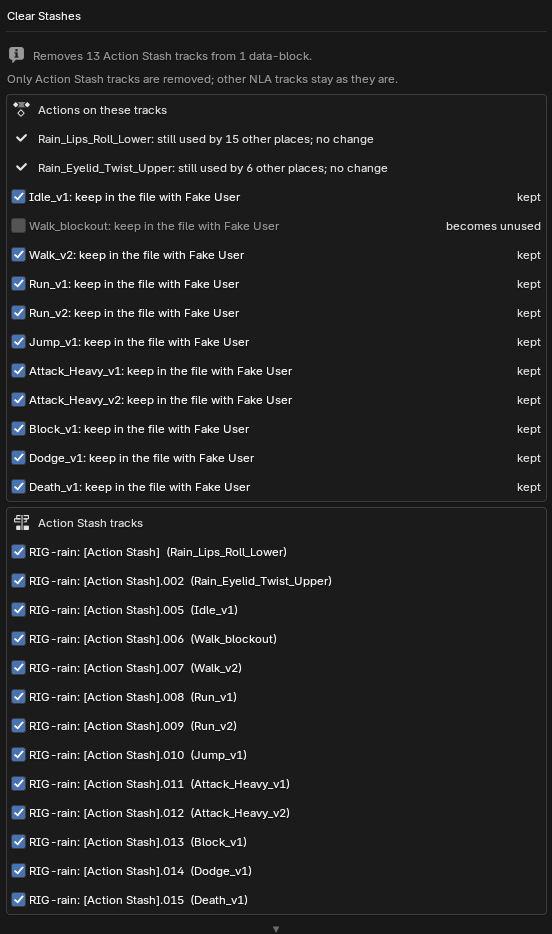
The preview on Rain's file, with one take let go. - Confirm. The status bar says what changed, and the details go to a text block named Actionyard Report (open it in the Text Editor). Only Action Stash tracks are removed; your other NLA tracks stay as they are.
- Changed your mind? One Ctrl+Z undoes the whole operation.
- If you let actions go, run Remove Unused Actions..., or save and reopen the file: Blender drops data with no users when it saves.
Character in the images: Rain Rig (CC) Blender Foundation | studio.blender.org, used under CC BY 4.0, with game actions and stashed takes we added. Rain is not included with Actionyard.
Deleting actions for good
- Delete Action Everywhere...: tick actions with the check box at the left of each row (or just click one). The preview lists every place that will lose each action. Then Actionyard removes it from all of them and from the file, in one undo step. The active action is cleared, NLA and stash strips are removed (a stash track left empty is removed too), and Action constraints are kept but lose their action.
- Remove Unused Actions...: deletes actions with no users. It keeps Fake User actions unless you tick "Also Fake User Actions", and always keeps actions marked as assets (pose library poses).
Deleting a stashed action as a data-block instead (what the Outliner's Delete does) removes the action but leaves its [Action Stash] track behind, holding a strip with no action. Delete Action Everywhere removes the track too.
Words used here
- Action Stash: a muted NLA track named "[Action Stash]" that keeps an action in the file. Blender's Stash operator makes one, and so does New Action for the previous take. Actionyard uses Blender's own rule: any track whose name contains "[Action Stash]" counts, including one you named that way yourself.
- Uses and Users: Uses is the number of places Actionyard lists under Used by; Users is Blender's own user count, which also counts the Fake User.
- Slot: since Blender 4.4, one action can hold animation for several data-blocks, one slot each.
Limits
- Requires Blender 4.4 or newer. Tested on Blender 4.4, 4.5 LTS and 5.2 LTS, on Linux; Windows and macOS have not been tested yet.
- A stash track whose strips have no action (what deleting a stashed action as a data-block leaves behind) is not listed or cleared in 1.1.0; delete it by hand in the NLA editor.
- Linked data, and everything a library override takes from its library file, is shown with a lock and never changed. Stash tracks you added on an override in your own file can be cleared.
- Delete Action Everywhere leaves an action alone when one of its strips is on a locked NLA track (not a stash track); unlock the track first.
- A data-block in NLA tweak mode is skipped; exit tweak mode first. A strip inside a meta strip loses its action but stays in the meta strip.
- The Actionyard Report text block grows with every change, including each click on a Used by row. Delete it whenever you like; it is made again on the next change.
- No onion skins, no channel locking. English only.
Privacy
Actionyard makes no network calls and collects nothing. It changes only the open .blend file, and only when you run one of its operators.
Support
Email [email protected] with your Blender version, your system, the lines from the Actionyard Report text block and, if you can, a small .blend file that shows the problem.